


FOX5 Vegas - Las Vegas News
2.9619.00 Reviews
App Specs
- Version
- Varies with Device
- Updated On
- License
- Free
- Downloads
- 100,000+
- Developer
- Gray Media
- Categories
- News & Magazines
- Platform
- Android
Screenshots



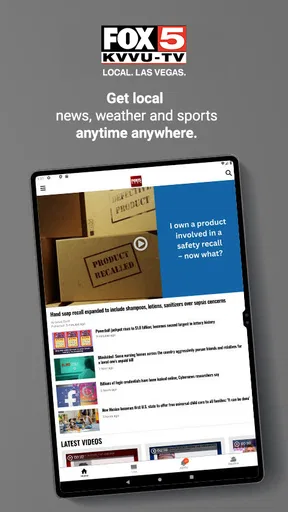
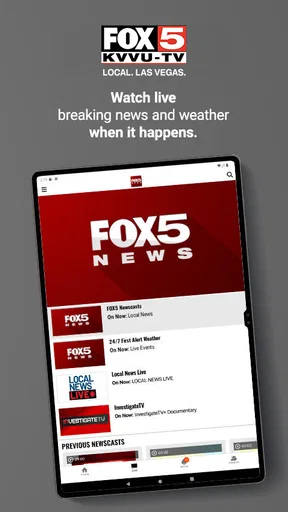

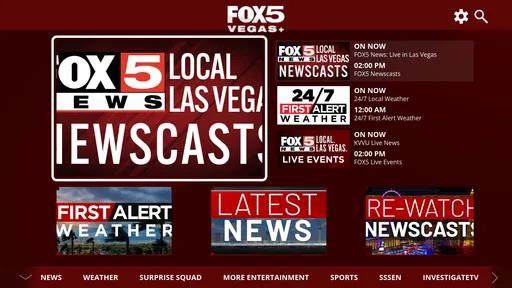
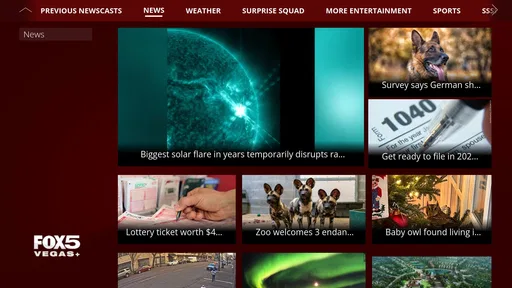
 Analysis by AppCompare
When I want a quick sense of what is happening around Las Vegas, I usually prefer a local news app over a broad national feed. FOX5 Vegas is built for that purpose: it is a free News & Magazines app from Gray Media that focuses on news in and around Las Vegas. After spending time with it, I see its main appeal clearly. It is most useful when local relevance matters more than having one giant stream of stories from everywhere.
The app has been available since August 6, 2012, and its long presence gives it the feel of an established local-news product rather than a temporary experiment. It is rated for Everyone, so its intended audience is broad. At the same time, its average rating of 2.9 from around 1,800 ratings suggests that the experience is not equally satisfying for all users. I would not treat that score as a reason to dismiss it, but I would take it as a reminder to judge the app by your own news habits and tolerance for mobile friction.
How the local-news experience works for different readers
I use a local news app differently depending on whether I live in Las Vegas, visit often, or am checking in from elsewhere. In this section, I’ll focus on how that local emphasis changes the app’s usefulness for each reader, and why a quick headline scan can be a better fit for some routines than a broad daily news feed.
Readability and navigation for quick checks
The strongest reason to install this app is simple: it keeps Las Vegas at the center of the experience. Instead of sorting through a national publisher’s homepage to find a local item, I can use a source whose identity is tied to the area. That matters during a busy morning, when I want to check local developments before work, or in the evening, when I want a short update without opening several unrelated news services.
I find this kind of focused app easier to understand than a general news aggregator when my question is local. A national app may offer more polished personalization, broader topic controls, and a larger range of sources, but it can also bury regional stories beneath national politics, entertainment, finance, and international coverage. FOX5 Vegas makes a different trade-off: less breadth in exchange for a clearer local purpose.
For a reader who scans rather than reads every article, the key benefit is the ability to use the app as a starting point. I can look for the most relevant headline, open the full story when it affects my plans, and leave the rest for later. That workflow is especially practical for people who follow traffic-related developments, public safety news, weather disruptions, community changes, or local events. I would not expect it to replace every other news source, but I do find it more direct for a Las Vegas-specific check-in.
There is also a useful distinction between reading local news and discovering news. A broad aggregator is better when I want to compare several publishers or deliberately explore unfamiliar subjects. This app is better when I already know the geographic area I care about. That makes it a focused tool rather than a complete replacement for a general-purpose news reader.
Worth Reading Before You Choose

EA SPORTS FC Mobile 26 Is a Bigger Football Game, but It Takes Time

Flipboard Shows What News Apps Must Do Beyond the Feed

Switching to Android Auto Means Rethinking Your Driving Routine

Google Calendar Makes a Crowded Week Easier to Manage

Ludo King Makes the Most of the Minutes Between Plans

Baby Panda World Brings Quick Play to Modern Phones, but Its Game Library Feels Busy
For someone with low vision or anyone who tires quickly while reading on a small screen, the practical test is not just whether headlines are present. It is whether the page feels comfortable at the device’s available text size, whether headlines are visually distinct, and whether moving from a headline to an article is straightforward. I would recommend checking those points during the first few minutes of use instead of assuming that a local focus automatically means an easy interface.
One habit that helps is to treat the app as a two-stage reader. First, scan only the headlines that relate to your immediate needs. Then open one story at a time and finish it before returning to the list. This reduces the visual clutter that can come from jumping between several stories and makes the experience more manageable for readers who prefer a slower pace.
Motor and sensory considerations in everyday use
News apps are often used with one hand, while standing on public transport, waiting in a queue, or moving between tasks. That changes what counts as a good design. In my experience, a local-news app is most comfortable when I can perform the basic actions—selecting a story, returning to the list, and continuing to browse—without precision gestures or a complicated sequence of taps.
FOX5 Vegas makes sense for short sessions, but I would be cautious about recommending it blindly to someone with limited dexterity. Mobile news pages can place several interactive elements close together, and a reader who relies on deliberate tapping may find rapid browsing less comfortable than expected. If you use a larger display, a stylus, or device-level touch accommodations, those settings may make the experience easier, but the benefit will depend on the phone and operating system rather than on a promise from the app itself.
The same applies to sensory needs. A person who is sensitive to movement, sudden audio, bright contrast, or crowded layouts should approach the app as a practical trial. News is often consumed in environments where attention is already divided, and a reader may want a quiet, text-first experience. I would begin with sound turned down and review the interface in a calm setting, then decide whether it remains comfortable during normal use.
For users who depend on screen readers, magnification, switch access, or voice control, the best approach is to test the exact tasks that matter most: finding a local story, opening it, reading through the article, and returning to the news list. Support can vary with the device, operating-system version, and the way individual content is presented. I would not assume that every element will behave identically just because the app is available to a wide age range.
A useful workaround for readers who struggle with long on-screen sessions is to use the app for selection rather than for constant browsing. Open it, choose the most relevant local story, and then read at a pace that suits you. This also helps people with attention-related difficulties because it turns an open-ended feed into a small, intentional task: identify what matters, read it, and stop.
Another practical consideration is the difference between urgency and depth. If I am checking a developing local situation while distracted, I want the first screen to help me orient myself quickly. If I am trying to understand a complicated issue, I need time, concentration, and possibly another source for context. The app is easier to use when I match it to the first task rather than expecting every story to serve as a complete research session.
Situational access for Las Vegas routines
The most convincing use case is a resident or regular visitor who wants a local-news checkpoint built into the day. Imagine leaving home and hearing that conditions may affect your route or plans. Instead of opening several unrelated services, you can check this app for a Las Vegas-focused update, decide whether the story is relevant, and continue with your morning. The value is not just speed; it is reducing the number of places you need to search.
I can also see it helping someone who has moved to the area and is still learning which local issues deserve attention. A national news app may tell you what is important across the country, but it will not necessarily help you build a sense of the city’s daily rhythm. A dedicated local source gives that person a more relevant starting point, even if they later compare important stories with other outlets.
For family members who live outside Las Vegas, the app can be a convenient way to check the area without maintaining a large collection of local websites. It may also suit someone who does not want a social-media feed to be their main source of local information. Social platforms can be fast, but they can also mix commentary, repetition, and unverified claims. A local news app offers a more purposeful place to begin.
Travelers should see it differently. If I were visiting Las Vegas briefly, I would use the app when I wanted local context, but I would not rely on it as my only travel tool. A visitor may need maps, venue updates, transportation information, and direct notices from businesses or public agencies. A news app can explain what is happening in the city, but it is not a substitute for every service needed during a trip.
Situational access also includes the quality of the connection and the environment where the app is opened. In a noisy place, a reader may prefer to skim text rather than listen to anything. In bright sunlight, screen glare can matter more than the app’s content. At home on a larger phone or tablet, longer reading may feel comfortable; outdoors, the same article may be better saved mentally as a quick headline check. These are not flaws unique to this product, but they affect whether it fits your routine.
Because the app is free, the barrier to trying it is relatively low. That makes it reasonable to install it alongside your existing news tools rather than forcing an immediate replacement. I would give it a few ordinary days: one rushed morning, one relaxed reading session, and one moment when a local story genuinely matters. That test tells you more than a single glance at the app’s listing.
What remains difficult and where alternatives may win
The average rating of 2.9 is worth keeping in mind because it points to uneven user satisfaction. A rating alone cannot explain whether the problem is navigation, performance, content expectations, or device compatibility, but it does suggest that some readers may encounter friction. I would install it with realistic expectations: the local focus is attractive, yet the overall experience may not feel as refined as the best-known national news applications.
The app’s narrow geographic focus is both its strength and its limitation. If your interests include international reporting, business coverage, science, technology, or a carefully customized mix of publishers, a general news aggregator will probably serve you better. If you want to compare several viewpoints side by side, a browser-based routine or multi-source reader may also be more suitable. FOX5 Vegas is not the right choice for someone who wants one application to cover every subject equally.
It may also be the wrong choice for a reader who dislikes local television-news presentation. Some people prefer long-form reporting, specialist publications, newsletters, or feeds arranged entirely by personal topics. A dedicated local station app can feel too focused for those users. I would skip it if your main goal is deep national analysis or a highly controlled reading environment.
Accessibility is another area where I would avoid overpromising. The Everyone rating tells me that the app is aimed at a broad audience, but it does not guarantee that every person will find the text, controls, timing, or content presentation comfortable. Readers with specific accessibility needs should test their essential workflow directly. If the app creates repeated obstacles, the mobile site, a screen-reader-friendly browser setup, or a different news reader may be a better option.
There is a trade-off between convenience and verification. A single local source is efficient, but important claims deserve comparison, especially when a story is developing or could affect safety, travel, work, or family plans. My preferred workflow is to use this app for discovery, then confirm high-impact information through an appropriate official channel or another reputable report. That is not a criticism of this app alone; it is a sensible habit for any single-source news tool.
One less obvious tip is to avoid judging the app during an unusually busy news cycle. A crowded stream can make any news product feel harder to navigate, while a quiet day may make it seem more polished than it is. I would assess the basic reading path and the relevance of the stories over several normal sessions. That gives a fairer picture of whether the app fits your attention span and local interests.
My inclusive verdict for local readers
FOX5 Vegas is a sensible free option for people who want Las Vegas news in a dedicated mobile space. Gray Media has kept the purpose clear: this is not trying to be a worldwide information hub. Its best quality is relevance, and its best use is as a quick local checkpoint that can lead you to a story worth reading.
The app has reached over 100,000 installs, which shows that it has found a meaningful audience, while its 619 reviews and 2.9 average rating point to a more mixed experience than its simple purpose might suggest. I would describe it as useful rather than universally polished. That distinction matters for readers who need dependable, low-friction navigation every time they open a news app.
I would recommend trying it if you live in Las Vegas, have close connections there, or regularly need local context. I would pair it with another source if you care about broad coverage, detailed analysis, or confirmation of important developing events. For travelers, it is a helpful local-news companion, not a complete trip-planning solution.
My final advice is to use it as a focused local starting point, not as your only window on the news. Its free access and Everyone rating make experimentation easy, and its regional purpose can save time when Las Vegas is the subject that matters. But readers with demanding accessibility requirements, strong preferences for long-form journalism, or a need for many sources in one place should compare it with alternatives before settling into a daily routine.
In short, I would keep FOX5 Vegas installed when local awareness is a priority and remove it when the interface or reading flow repeatedly gets in the way. The right decision depends less on the app’s headline promise than on how comfortably you can find, read, and act on the specific Las Vegas stories you need.
Pros
- Fast updates on Las Vegas breaking news and local events.
- Useful weather forecasts and alerts for the Las Vegas area.
- Live newscasts help users follow major stories in real time.
- Covers traffic
- crime
- sports
- and community news in one app.
- Video reports provide more context than short written headlines.
Cons
- Some alerts may feel frequent
- especially during developing stories.
- Video and live-stream features can use significant mobile data.
- Coverage is focused mainly on Las Vegas and nearby communities.
- Advertising may interrupt browsing or appear alongside news content.
- Certain content may require a stable connection to load properly.
FAQs for FOX5 Vegas - Las Vegas News
What is FOX5 Vegas – Las Vegas News?
FOX5 Vegas – Las Vegas News is a local news app focused on the Las Vegas area and surrounding communities. It provides access to breaking news, weather updates, traffic information, sports coverage, entertainment stories, and video reports. The app is designed for users who want a convenient way to follow developments in Southern Nevada from an Android or iOS device.
What type of news and content can I find in the FOX5 Vegas app?
The app typically includes local and regional news, crime and public safety reports, politics, consumer stories, health updates, sports, entertainment, and community coverage. Users can also find live or on-demand video, weather forecasts, severe-weather alerts, traffic information, and special reports. Available sections and content may change depending on current events and FOX5’s publishing schedule.
Does FOX5 Vegas provide live news, weather alerts, or breaking-news notifications?
Yes, FOX5 Vegas is intended to keep users informed as events develop. Depending on the station’s coverage and your device settings, you may receive breaking-news notifications, weather warnings, updates about major incidents, and access to live or recently published video reports. Notifications can usually be enabled or disabled in the app or through your phone’s system settings.
Is the FOX5 Vegas app free to download and use?
The FOX5 Vegas app is generally available as a free download, allowing users to browse news articles, watch selected videos, check weather information, and receive updates without paying a normal download fee. However, the app may contain advertising, and some live streams or video content could be subject to availability, regional restrictions, mobile-data usage, or changes made by the publisher.
Does FOX5 Vegas require my location, and can I use it outside Las Vegas?
You can usually use the app outside Las Vegas to read FOX5’s coverage, although its main focus remains Southern Nevada. Location access may help personalize weather, traffic, or local alerts, but it is not always required for basic browsing. If privacy is important to you, review the permission requests and disable location access in your device settings when personalized location features are not needed.


